
Words of Wonders: Guru
Fugo GamesWord
4.95.74K Reviews
- Version
- 3.6.0
- Installs
- 10.00M
- Age Rating
- Everyone
Screenshots
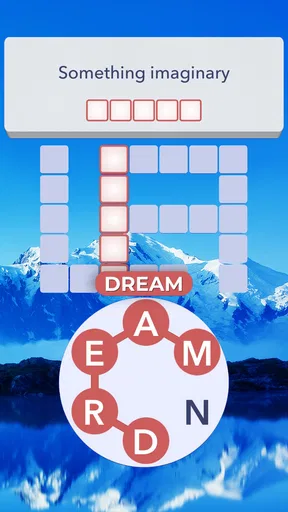
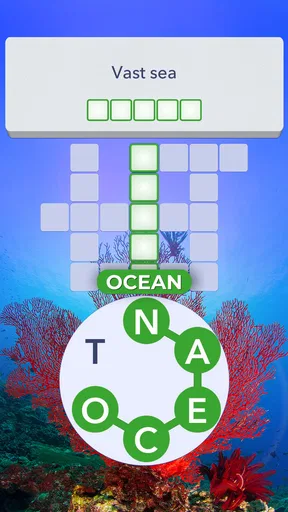

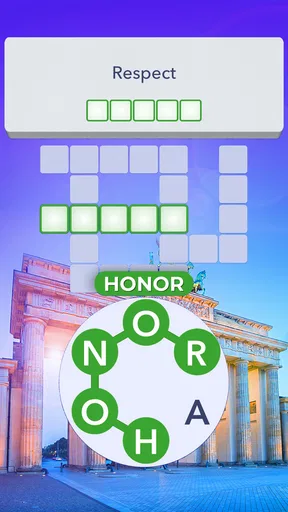
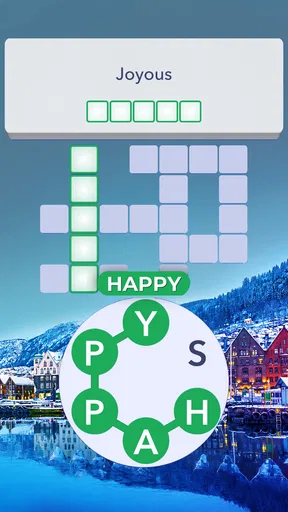
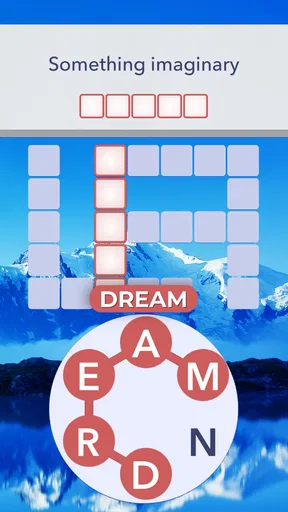
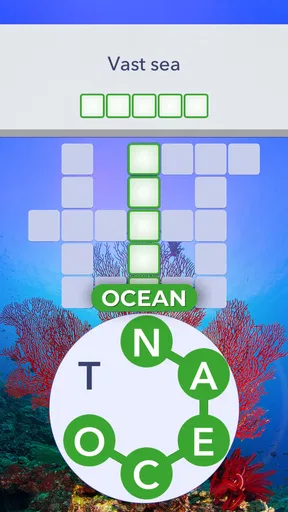
Our Review of Words of Wonders: Guru
 Analysis by Appyee
Starting a new word game can feel like a small gamble: will the rules make sense, and will the puzzles stay enjoyable once the easy answers are gone? I found Words of Wonders: Guru approachable from the start because its central task is easy to grasp: connect letters to make words that fit a crossword-style layout. The satisfaction comes from spotting how the answers intersect, not from learning a long list of controls first.
What to expect from the word puzzles
This is a word puzzle game from Fugo Games, built around linking letters and filling crossword spaces. The travel-themed presentation gives levels a sense of place, while the actual challenge is language: noticing familiar words, testing less obvious ones, and working out how the available letters fit together. I like that the basic idea is simple enough for a quick session, but the later puzzles can take more thought.
The game is free to download and is rated for Everyone. Its average rating is 4.9 from around 306,000 ratings, and it has over 10 million installs. Those figures suggest that it has found a broad audience, though they don’t mean every puzzle style will suit every player. If you enjoy calmly solving word combinations, it’s an easy one to try; if you want a story-heavy adventure or a fast action game, the crossword focus may feel too restrained.
Getting started without overthinking it
On opening the game, I’d recommend treating the first puzzles as a chance to learn its rhythm rather than rushing through them. Look at the letter set, then scan the empty crossword spaces for short answers and shared letters. Finding one word often gives you a useful starting point for the next, so it’s worth checking how each answer crosses with the others before spending a hint.
The game’s interface is designed to make the main action straightforward, which helps if you haven’t played this kind of mobile word puzzle before. The current version is 2.1.17, and it supports devices running Android 8.0 or later. Once you’re in a puzzle, the most useful early habit is to try a few combinations yourself before deciding you’re stuck; that keeps the game feeling like a word challenge instead of a sequence of hint taps.
Your first satisfying solve
A good first success is not necessarily finishing a level as quickly as possible. It’s the moment a short word reveals a crossing letter and suddenly makes a longer answer obvious. I find that moving between the open spaces in this way is more rewarding than staring at the whole board at once. If an answer seems close but doesn’t fit, check the crossings: one uncertain letter can make an otherwise plausible guess wrong.
For a practical routine, I’d start with the shortest gaps, try the obvious words, and then revisit the remaining spaces using the letters those answers have confirmed. If I’m still stalled, I take a brief pause and look again rather than immediately using a hint. That small reset is useful during a commute or a quiet break, when it’s easy to mistake a momentary mental block for a genuinely difficult puzzle.
Playing in short sessions and deciding what suits you
I use short sessions to judge whether a word game fits my day, not just whether its puzzles are clever. Here, I’d decide in advance whether I want to solve independently or simply unwind, since that changes how useful hints feel. That small choice also makes it easier to notice which parts of the experience suit me and where a different word-game style might be a better match.
Hints, coins, and the temptation to rush
The hint system can reveal a letter or a whole word in exchange for coins. Completing levels can earn coins, and in-app purchases are available, ranging from $0.39 to $39.99 per item. I’d treat hints as a way past a stubborn snag, not as the default way to solve each board. Try the crossing-letter method first; if you use help, revealing just one letter can preserve more of the puzzle than revealing a complete answer.
That choice matters because a hint can solve the immediate problem while also removing the chance to make a useful connection yourself. When I want a relaxed, low-pressure session, I’m more willing to accept a nudge. When I’m playing specifically to exercise my vocabulary, I’d rather step away and return with fresh eyes. The best approach depends on whether the goal is easy progress or a little more mental effort.
How it fits into an ordinary day
I can see this working well as a small routine: open a level while waiting for a bus, solve a few spaces, and put the phone away when the ride arrives. The crossword format gives a session a natural stopping point, unlike a game that keeps pushing one match or round into another. It also works for a quiet break at home, where you can take more time over a difficult combination without feeling hurried.
Compared with a traditional crossword, the letter set narrows the possible answers and makes the task feel more guided. Compared with a word-search game, you’re building words into crossing spaces rather than simply scanning a grid for a list. That makes this a useful middle ground for someone who wants more structure than an open-ended word scramble, but less reading and theme knowledge than some newspaper-style crosswords demand.
Where the experience can feel less smooth
Word puzzles can be sensitive to vocabulary and expectations. If you’re confident that a word should fit but it doesn’t, avoid repeating the same swipe without reconsidering the crossing letters; checking the pattern is usually a better use of time. The challenge may also feel uneven from one board to another: a puzzle can be quick when its words come readily to mind, then slow down when a less familiar combination is needed.
There are ads, and they may interrupt the relaxed pace for players who prefer uninterrupted sessions. An in-app purchase can remove them if that is important to you, but I’d first try the free version and see whether the interruptions actually bother you. The game also offers competitive and community elements, yet those aren’t essential to the main puzzle loop. If all you want is solo solving, you can focus on the boards rather than treating social play as a requirement.
Who is likely to enjoy it—and who may want another style
I’d recommend it to people who like crosswords but want a more guided mobile format, and to casual players who want a word challenge that can be picked up for a short break. It may also suit someone returning to word games after a long time: the basic move is intuitive, while the crossing spaces give you a way to reason through answers rather than relying only on obscure vocabulary.
I’d skip it if you’re looking for a deep narrative, action, or a completely uninterrupted experience. Players who prefer open-ended word creation may find the crossword layout restrictive, while dedicated crossword fans may want more clue-based solving than this letter-linking format provides. A conventional crossword is likely a better fit if you enjoy interpreting clues; a simple word search is a better fit if you’d rather spot words than assemble them.
Small habits that make solving easier
One useful habit is to separate what you know from what you’re guessing. I mentally mark the answers supported by several crossings, then focus on the uncertain spaces. This avoids letting one hunch steer the whole board. Another is to rotate attention: if a long word stalls, solve a short crossing elsewhere and come back. The new letters can turn a vague possibility into a clear answer without spending coins.
I also wouldn’t measure a good session by how many levels I clear. If I’m playing to keep my mind engaged, taking time over a tricky board is part of the appeal. If I’m only filling a few spare minutes, a hint can be a reasonable trade-off. Deciding that before you begin helps prevent the game’s progress loop from turning a relaxing break into a rush to finish.
First impressions
From the moment I downloaded Words of Wonders: Guru, I was impressed by its sleek and colorful design. The app has a clean interface that's not only easy on the eyes but also super intuitive. Whether you’re a seasoned wordsmith or a newcomer to the world of word puzzles, navigating through the game is a breeze. The vibrant graphics add a nice touch, making you feel like you're on a wordy adventure around the world.
The Gameplay Experience
So, what's the game all about? Well, it's a delightful mix of crossword puzzles and word searches, where each level takes you to a new, exotic location. The idea is to connect letters to form words that fit the crossword layout. Sounds simple, right? But don’t be fooled! As you progress, the puzzles get trickier, challenging even the most linguistic minds.
One of my favorite aspects of the game is the variety. There are hundreds of levels, each themed around different wonders of the world. It’s like taking a virtual tour while exercising your brain. Plus, there are daily challenges to keep things fresh and exciting.
What Keeps Me Coming Back
Aside from the addictive nature of the puzzles, Words of Wonders: Guru has a few features that I really appreciate. Firstly, the hint system is a lifesaver. When you’re stuck, you can use coins to reveal a letter or even a whole word. The game rewards you with coins for completing levels, but you can also purchase them if you’re in a pinch.
Another cool feature is the multiplayer mode. You can challenge friends or random players to see who can solve the puzzles faster. It’s fun and adds a competitive edge to the game, which I love.
The Community Aspect
Words of Wonders: Guru has a surprisingly active community. You can connect with other players, share strategies, and even participate in community events. It’s a great way to meet people who share your passion for word games.
Any Room for Improvement?
Honestly, there isn’t much to criticize about Words of Wonders: Guru. If I had to nitpick, I’d say that the ads can be a bit much at times. However, they’re not overly intrusive, and you can remove them with an in-app purchase if they bother you.
Also, while the hint system is helpful, it can be tempting to rely on it too much. But hey, that’s more about self-control than a flaw in the game itself!
Final Thoughts
All in all, Words of Wonders: Guru is a fantastic app that offers hours of entertainment and mental exercise. It’s well-designed, engaging, and perfect for anyone who loves a good word challenge. Whether you’re waiting in line or just unwinding at home, it’s the perfect companion.
If you haven’t tried it yet, I highly recommend giving it a go. You might just find yourself hooked, like I did!
Happy puzzling, and may your vocabulary grow ever stronger!
Privacy and Permissions
See what permissions an app requests and how it handles your data.
- Wi-Fi connection information
- view Wi-Fi connections
- Other
- view network connections, full network access, control vibration, prevent device from sleeping, Google Play license check
Verdict
Strengths of Words of Wonders: Guru
- Engaging word puzzles to boost vocabulary.
- Beautiful graphics enhance user experience.
- Offline mode available for on-the-go play.
- Regular updates with new levels and challenges.
- Intuitive interface that's easy to navigate.
Limitations of Words of Wonders: Guru
- Contains ads that can interrupt gameplay.
- Some levels may feel repetitive.
- In-app purchases can be pricey.
- Limited hints without purchasing extras.
- No multiplayer or social features available.
Other Releases by Fugo Games
View All


Similar Picks in This Category
View All
Word Search - Word Puzzle Game
Bluetile4.8

Word Search Quest - Puzzles
Blackout Lab4.8

CodyCross: Crossword Puzzles
Fanatee, Inc.4.7

Words of Wonders: Crossword
Fugo Games4.9

Wordscapes: Word puzzle game
PeopleFun4.7

Word Search Explorer
PlaySimple Games4.9
Frequently Asked Questions
What is Words of Wonders: Guru and how does it work?
Words of Wonders: Guru is a word puzzle game where players are challenged to connect letters to form words and solve crossword puzzles. The game features beautiful themes and a wide variety of levels set in different locations around the world. It also offers daily challenges and events to keep gameplay engaging.
Is Words of Wonders: Guru free to play?
Yes, Words of Wonders: Guru is free to download and play. However, it offers in-app purchases for items like hints and extra moves, which can enhance the gaming experience. Players can enjoy the core features without spending money, but optional purchases are available for convenience.
What are the system requirements for Words of Wonders: Guru?
For Android users, a device running Android 5.0 or higher is recommended. For iOS users, the game requires iOS 10.0 or later. It's compatible with iPhone, iPad, and iPod touch. Ensure you have enough storage space and a stable internet connection for downloading updates.
Does Words of Wonders: Guru offer multiplayer options?
Words of Wonders: Guru primarily focuses on single-player gameplay. However, it includes social features like leaderboards where you can compare your progress with friends and other players globally. While it lacks direct multiplayer modes, these features add a competitive edge to the game.
How can I get help if I'm stuck on a level?
If you find yourself stuck on a level in Words of Wonders: Guru, you can use hints to reveal letters or words. These hints can be purchased with in-game currency or through in-app purchases. Additionally, joining online communities or forums can provide tips and strategies from other players.
Play our best games!


